ESP32 Dev Module+ST7789V(240×320)
気象庁 Jsonデータと来て次は地震情報。
昨日は長野ででかい地震があった。最近テレビの番組でも地震や火山などの災害に備えましょう的な報道が増えてきた気がする。
たまたま、今取り組んでいたのが気象情報だったこともあり次にやってみることにした。さて、地震情報はどこから取り出せばいいんだ?
早速、Jsonデータのありかを探してみる。
あったんだけど、データがでかくて階層が深くて、ESP32ごときじゃRAMが足りん!
という警告(お手上げ状態でESP32がハングアップ!!無反応状態)
Aiと相談するも、何回も同じコードをぐるぐる繰り返し・・・。つまり打つ手がない!状態なのに気づく。
全部じゃなくて、必要なところだけ見つけて取り出してよ。ここさえ見れば後は見なくていいからね!(なんか昔手間取っていたときにこんな言い方されたことがあったような・・・。)
#include <LovyanGFX.hpp>
#include <WiFi.h>
#include <WiFiClientSecure.h>
#include <ArduinoJson.h>
// ------------------------------
// LovyanGFX 設定
// ------------------------------
#include <LovyanGFX.hpp>
class LGFX : public lgfx::LGFX_Device {
lgfx::Panel_ST7789 _panel;
lgfx::Bus_SPI _bus;
public:
LGFX(void) {
{ // SPI設定
auto cfg = _bus.config();
cfg.spi_host = VSPI_HOST;
cfg.spi_mode = 0;
cfg.freq_write = 40000000;
cfg.freq_read = 16000000;
cfg.spi_3wire = false;
cfg.use_lock = true;
cfg.dma_channel = 1;
cfg.pin_sclk = 18;
cfg.pin_mosi = 23;
cfg.pin_miso = -1;
cfg.pin_dc = 2;
_bus.config(cfg);
_panel.setBus(&_bus);
}
{ // パネル設定
auto cfg = _panel.config();
cfg.pin_cs = 5;
cfg.pin_rst = 4;
cfg.pin_busy = -1;
cfg.memory_width = 240;
cfg.memory_height = 320;
cfg.panel_width = 240;
cfg.panel_height = 320;
cfg.offset_x = 0;
cfg.offset_y = 0;
cfg.invert = true; // ★ TFT_INVERSION_ON と同じ
cfg.rgb_order = false;
cfg.bus_shared = false;
_panel.config(cfg);
}
setPanel(&_panel);
}
};
LGFX tft;
// ------------------------------
// 日本語フォント(ゴシック20)
// ------------------------------
static const lgfx::U8g2font font_jp(lgfx::fonts::lgfxJapanGothic_20);
// ------------------------------
// WiFi
// ------------------------------
const char* ssid = "XXXXXXXX";
const char* password = "XXXXXXXX";
const char* host = "www.jma.go.jp";
uint32_t getColorByShindo(int shindo) {
if (shindo <= 1) return TFT_WHITE; // 震度1
if (shindo == 2) return TFT_YELLOW; // 震度2
if (shindo == 3) return TFT_ORANGE; // 震度3
if (shindo == 4) return TFT_RED; // 震度4
return TFT_PURPLE; // 震度5弱以上
}
// ------------------------------
// Unicode \uXXXX → UTF-8
// ------------------------------
String decodeUnicode(String s) {
String out = "";
for (int i = 0; i < s.length(); i++) {
if (s[i] == '\\' && s[i+1] == 'u') {
String hex = s.substring(i+2, i+6);
int code = (int) strtol(hex.c_str(), NULL, 16);
if (code < 0x80) {
out += char(code);
} else if (code < 0x800) {
out += char(0xC0 | (code >> 6));
out += char(0x80 | (code & 0x3F));
} else {
out += char(0xE0 | (code >> 12));
out += char(0x80 | *1;
out += char(0x80 | (code & 0x3F));
}
i += 5;
} else {
out += s[i];
}
}
return out;
}
// ------------------------------
// JSON 抽出
// ------------------------------
String extractValue(String json, String key) {
int idx = json.indexOf(key);
if (idx < 0) return "";
idx = json.indexOf(":", idx);
int start = json.indexOf("\"", idx + 1);
int end = json.indexOf("\"", start + 1);
return json.substring(start + 1, end);
}
String extractHypocenterName(String json) {
int pos = json.indexOf("\"Hypocenter\"");
pos = json.indexOf("\"Area\"", pos);
pos = json.indexOf("\"Name\"", pos);
pos = json.indexOf(":", pos);
pos = json.indexOf("\"", pos);
int end = json.indexOf("\"", pos + 1);
return json.substring(pos + 1, end);
}
String extractMagnitude(String json) {
int pos = json.indexOf("\"Magnitude\"");
if (pos < 0) return "";
pos = json.indexOf(":", pos);
while (pos < json.length() && (json[pos] < '0' || json[pos] > '9')) pos++;
int start = pos;
while (pos < json.length() && (isdigit(json[pos]) || json[pos] == '.')) pos++;
return json.substring(start, pos);
}
// ------------------------------
// HTTPS GET(全文読み切り)
// ------------------------------
String getSmallJson(String path) {
WiFiClientSecure client;
client.setInsecure();
if (!client.connect(host, 443)) return "";
client.print("GET " + path + " HTTP/1.1\r\n"
"Host: www.jma.go.jp\r\n"
"Connection: close\r\n\r\n");
while (client.connected()) {
String line = client.readStringUntil('\n');
if (line == "\r") break;
}
String json = "";
unsigned long timeout = millis();
while (millis() - timeout < 3000) {
while (client.available()) {
json += (char)client.read();
timeout = millis();
}
}
return json;
}
// ------------------------------
// list.json の先頭1件
// ------------------------------
String getFirstItemJson() {
WiFiClientSecure client;
client.setInsecure();
if (!client.connect(host, 443)) return "";
client.print("GET /bosai/quake/data/list.json HTTP/1.1\r\n"
"Host: www.jma.go.jp\r\n"
"Connection: close\r\n\r\n");
while (client.connected()) {
String line = client.readStringUntil('\n');
if (line == "\r") break;
}
String buf = "";
bool started = false;
int brace = 0;
while (client.available()) {
char c = client.read();
if (c == '{') { started = true; brace++; }
if (started) buf += c;
if (c == '}') {
brace--;
if (brace == 0) break;
}
}
return buf;
}
// ------------------------------
// メイン
// ------------------------------
void setup() {
Serial.begin(115200);
tft.init();
tft.setRotation(1);
tft.fillScreen(TFT_BLACK);
tft.setFont(&font_jp);
tft.setTextColor(TFT_WHITE);
tft.setCursor(10, 10);
tft.println("WiFi接続中...");
WiFi.begin(ssid, password);
while (WiFi.status() != WL_CONNECTED) delay(200);
tft.println("WiFi OK");
String first = getFirstItemJson();
StaticJsonDocument<5000> doc;
if (deserializeJson(doc, first)) {
tft.println("list.jsonエラー");
return;
}
String file = doc["json"].as<String>();
String time = doc["rdt"].as<String>();
String detail = getSmallJson("/bosai/quake/data/" + file);
String area = decodeUnicode(extractHypocenterName(detail));
String mag = extractMagnitude(detail);
String maxi = extractValue(detail, "\"MaxInt\"");
tft.fillScreen(TFT_BLACK);
tft.setCursor(10, 10);
tft.println("【最新の地震】");
tft.println("");
tft.println("発生時刻:" + time);
tft.println("震源地:" + area);
tft.println("マグニチュード:" + mag);
int shindo = maxi.toInt();
tft.setTextColor(getColorByShindo(shindo), TFT_BLACK);
tft.println("最大震度:" + maxi);
// 終わったら白に戻す
tft.setTextColor(TFT_WHITE, TFT_BLACK);
}
void loop() {}
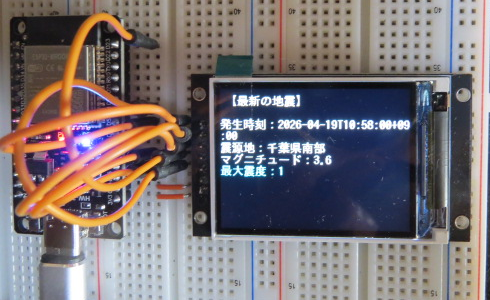
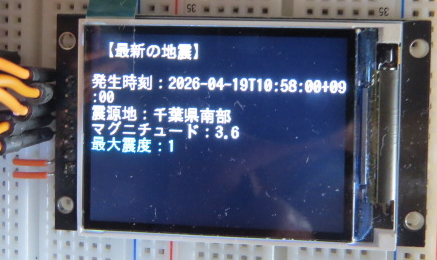
単純に発生時刻・震源地・最大震度・マグニチュードを表示するだけです。
全国を網羅しているのでちょくちょく情報が変わります。
変わるのを見て、おお~と思うが、素直には喜べない。
ARDUINO IDE2.3.6
LovyanGFX 1.2.19
ボード 3.3.3
*1:code >> 6) & 0x3F
